






[10:14 Sat,9.May 2026 by Thomas Richter] |
The Video Assist app turns an iPad into a professional on-set monitor with recording capabilities—all that is required is a USB capture card that converts the HDMI or SDI video signal from a camera or wireless video receiver to USB-C/Thunderbolt. Video Assist offers features such as LUTs, compositing, focus peaking, false color, zebras, video transform, grid lines, center marks, aspect ratio masks, anamorphic desqueeze, and audio meters. Auto trigger supports automatic recording for various cameras, and the live video, as well as the recorded footage, can be output clean to an external monitor.
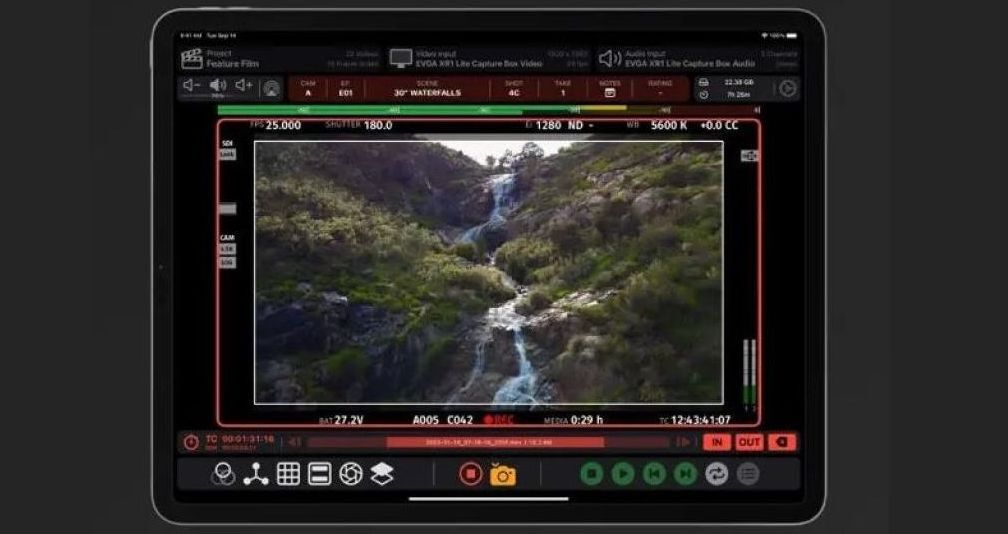 Video Assist The recently released update to version 2.1.2 brings several new features, such as support for up to three masks, an automatic record trigger for various Canon cameras, metadata extraction for RED and Sony Venice cameras including filename matching, and more. Video Assist for iPad Version 2.1.2- Multiple masks! The mask effect now supports three separate masks. Easily display multiple frame lines simultaneously. Each mask has independent settings for shading, color, line thickness, etc. - Record trigger for Canon cameras! Record trigger can now be used with the Canon C50 and Canon C400. All video output display modes are supported. Canon cameras that use the same type of video output will also work. - Metadata extraction for RED and Sony Venice! Status information displayed on the camera feed can be extracted via computer vision. Metadata fields include clip name, frame rate, lens, aperture, ND filter, exposure index, shutter speed, white balance, color correction, and timecode start/end. - Match camera filenames for RED and Sony Venice! The camera filename can be detected via metadata extraction and used for clips recorded in Video Assist. - Projects now show their total file size in the project view. This makes it easy to see which projects are taking up a lot of storage space on your iPad. - Mask aspect ratios can now be quickly selected via the context menu. Tap and hold "Aspect Ratio" when using the mask effect to select from common aspect ratios.  Video Assist Bug Fixes- Fixed an issue where record trigger would repeatedly trigger record and stop when using the Sony Burano in S&Q mode. - Fixed an issue where files were recorded with incorrect orientation when using the rear iPad camera. - Fixed an issue where the composite effect could unintentionally hide the "From Project" selection view. - Fixed an issue where the resolution and frame rate selection menu was difficult to press on iOS 18. - Fixed an issue where the context menu for mask and composite was difficult to press on iOS 18. - Added support for the 11” and 13” M4 iPad Air. Demo of Video Assist 2.0: PricingVideo Assist can be downloaded from the Apple App Store; the free demo version adds a watermark and is intended for testing compatibility with your capture card and camera before purchasing. The Video Assist basic subscription costs .99 per year, and the Pro subscription—which includes features such as LUTs, focus peaking, false color, zebras, compositing, ProRes recording, and metadata extraction—costs .99 per year. Supported devices include capture cards from Accsoon, Elgato, and AJA, among others.  more infos at bei apps.apple.com more infos at bei apps.apple.comdeutsche Version dieser Seite: Video Assist App verwandelt iPad in Profi-Vorschau-Monitor |
 |
|
|