






[11:47 Thu,9.July 2026 � by Thomas Richter] ��� |
At NAB 2026, Blackmagic released the new standalone app "Fairlight Live," a software-based digital mixer for Mac and Windows that is completely free. Now, after several beta releases, the final version, Fairlight Live 1.0, is online. Fairlight Live is a software-based broadcast mixer for complex live audio productions with thousands of input channels, integrated effects, surround/immersive audio, snapshots, virtual sound check, cue player, talkback, mix-minus, extensive routing, and channel strips with EQ, dynamics processing, panning, and plugin support.
Anyone already familiar with Fairlight in Resolve will find much of the new app familiar. Like many digital mixers, Fairlight Live can be set up individually. Inputs and buses can be added or their configuration changed at any time. All "productions" can be saved as complete snapshots, including the mixer layout, signal routing and processing, and the cue player. 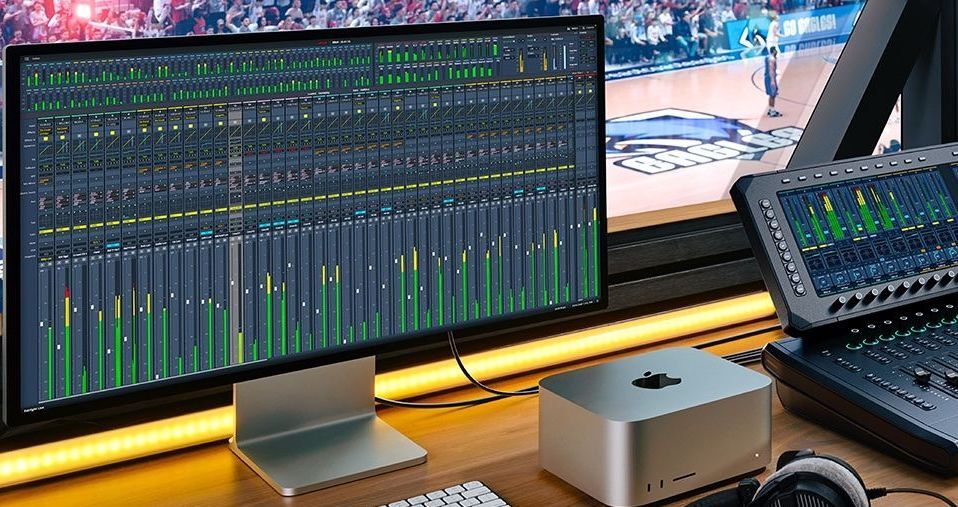 Blackmagic Fairlight Live Thousands of Input ChannelsFairlight Live supports hundreds and even thousands of input channels in a variety of formats. Each channel features integrated EQ, dynamics, and panning options to control input levels, placement, and clarity. The versatile panning supports 1D, 2D, and 3D, and there is a spherical panner for Ambisonics formats and spatial audio. For workflows using plugins, four effect slots are available per channel. In the bus management window in the menu bar, you can add main, sub, aux, or n-1 buses and define their format, name, and color. Via the bus assignment window or directly in the mixer, you can distribute inputs to buses or buses to buses. To distribute individual mixes to multiple separate destinations such as stage monitors, translation channels, or recording devices, you can use output matrix buses without altering the main program mix. Fairlight Live supports up to eight simultaneous mixes for output.  Blackmagic Fairlight Live Fairlight Live also supports up to 128 VCA groups. The "Show Settings" dialog provides options for moving faders and overriding mute or solo modes. Even nested VCAs are supported. This allows a VCA master to control all commentator microphones simultaneously, while individual live commentaries are controlled by nested VCAs. Every channel in Fairlight Live has a full set of integrated effects. For precise control of sound and dynamics, every input and bus is equipped with a 6-band EQ, expander/gate, compressor, limiter, and panner. Fairlight Live also offers an extensive library of 30 native plugins, including de-esser, reverb, delay, and many more. Third-party AU and VST plugins are also supported.  Blackmagic Fairlight Live Talkback, Cue, and On-Air ModeFairlight Live features broadcast functions that provide security and integrated control for live productions. You can easily set up and manage four talkback groups, communicate with presenters and crew via the cue/conference mode, and distribute n-1 buses to provide clean signals to remotely connected guests. On-air mode locks certain functions, while remote gain control allows microphone preamps to be adjusted directly at the source. Input delay ensures temporal precision through signal alignment. For switching between channels and buses, users have the Audio-Follow-Video (AFV) function. Additionally, there are dual inputs for redundancy. Fairlight Live offers an integrated cue player that provides two types of cues. There are 16 audio cues for jingles, commercials, and stingers, as well as 16 MIDI cues for controlling hardware such as lighting and fog machines. Cues can be triggered with a custom keyboard shortcut, a cue button on a Fairlight Live console, or with third-party MIDI control. Recording FunctionLive performances and concert rehearsals can also be recorded and played back with Fairlight Live—users can use these recordings for Virtual Sound Check (VSC) to provide artists and crew with an accurate playback of the live mix for rehearsals. A band&s rehearsal can also be recorded and played back this way, allowing levels, EQ, dynamics, panning, and cues to be fine-tuned before the broadcast. The snapshot function allows the entire mixer status to be saved and reloaded.  Blackmagic Fairlight Live SMPTE-2110 SupportFairlight Live was developed for SMPTE-2110 workflows and offers full 2110 audio integration for modern IP-based broadcast productions. For seamless connection to 2110 networks, the application enables primary I/O integration, allowing audio engineers to extract audio streams selectively from any source. PTP clock synchronization ensures precise timing across all devices, while audio remains perfectly aligned with video and other streams via sample-level delay compensation. What’s Next?The features of future Fairlight versions can be inferred from the modes that are not yet supported but have already been announced, such as Failsafe, Prep, and Remote mode for backup/redundancy, offline preparation, and dual-operator operation.  Blackmagic Fairlight Live Audio Panels Hardware Console ControlFairlight Live was designed for integration with ATEM live production switchers, but numerous audio interfaces can be used via USB or Thunderbolt. Blackmagic itself has recently introduced several dedicated  hardware consoles specifically for Fairlight Live. hardware consoles specifically for Fairlight Live. Manual is OnlineBlackmagic has also just released a user manual for Fairlight Live 1.0 in the form of a 74-page PDF, which introduces the basic controls of the Fairlight Live user interface and provides an overview of how to work with it. We also have an article about Fairlight Live in which we describe the features and explain which tasks it is suitable for. What can Fairlight Live do?Key Features - Fully featured software-based broadcast mixer for high-quality live audio. - Supports hundreds of channels with wide formats and complex mixes. - Supports mono, stereo, LCR, 5.1 surround, immersive, and ASAF. - Optimized for low-latency operation on macOS and Windows. - Flexible redundancy with user-configurable multiple failsafe levels. - Direct ATEM connectivity via USB with automatic template support. - Supports standalone use, Fairlight Live panels, or MCU consoles. - Compatible with Core Audio, ASIO, and 2110 interfaces. - Native support for surround, immersive, and spatial audio workflows. - Snapshots save mixer status for recall during live performances. - Virtual Sound Check ISO recording for rehearsals and calibration. - Dedicated cue player for sound effects and stingers. - MIDI cues for triggering external hardware such as lighting, etc. - Comprehensive integration for native, AU, and VST plugins. - Dedicated support for remote iOS and Android tablet controllers. Broadcast and System Functions - Optimized for reliability in live broadcasts and live productions. - On-air mode prevents accidental changes to controls during live feeds. - Direct routing, audio I/O, and AFV control to ATEM via USB. - Audio Follow Video synchronizes audio fades with video switcher transitions. - Mix-minus buses remove commentator voices from return channels. - Extend on Talkback to maintain communication during specific cues. - Dual operation allows simultaneous physical and remote control. - Customizable actions and programmable GPI/O for external triggers. - A/B input for quick selection of an alternative redundant input. - Backup processor mode for failsafe hardware redundancy. - Internal signal generator for calibration and testing. Bus Types - Support for dozens of main output mixes. - Submix groups via direct patch and post-fader. - Aux mix groups pre- and post-fader with level and pan control. - Full mix-minus support for talkback groups. Channel Strip and Processing - A/B input selection, remote gain, source patching, and master level. - Integrated compressor, gate or expander, and limiter. - Dedicated and integrated 6-band equalizer interface per channel. - High-resolution level and dynamics meter displays. - Dedicated fader, pan, select, mute, and solo controls. - Integrated 1D, 2D, and 3D panner with support for immersive workflows. - Power-style meters for Ambisonic channel level display. - Support for 4 plugins plus ChainFX for up to 24 slots per channel. - Fader flip control to reassign fader hardware to aux sends or gain. - Spill control to expand grouped channels across fader banks. - Input management of gain and delay for lip-sync. - VCA groups for single-fader control of multiple channels. Monitoring and Solo Logic - PFL and AFL monitoring signals pre- or post-fader. - Hybrid and backstop PFL for advanced soloing from fader positions. - Solo inject and outs allow dedicated routing for engineer monitoring. Routing and Mixing - Aux and sub routing for independent monitor mixes. - Secondary dialogs for level, pan, and pre/post-fader switching. - Solo and mute for instant channel isolation or muting. - Camera number selection for Audio-Follow-Video automation. - Support for studio and control room monitoring. - Loudness meters and system status controls. Channel Layout and User Interface - Visual channel identifiers include color, number, and custom naming. - Full channel index list for renaming, reformatting, and reordering. - Inspector for audio parameter controls including ASAF controls. - Highly visible meter bridge overview of all signal levels. - Signal level indicators including power meters for immersive audio. Talkback - Extensive and versatile talkback functionality. - Integrated talkback communication routing for talent or crew. - Direct talk to any channel. - Mix-minus for quick creation and removal of clean-feed buses. - Status indicators for four independent talkback groups. Four Operating Modes - Primary mode for normal mixer operation. - Failsafe provides backup and redundancy with support for a second machine. (Not included in this version) - Prep mode for offline show creation and off-site reconfiguration. (Not included in this version) - Remote mode allows two operators with segmented controls. (Not included in this version)  �more infos at bei www.blackmagicdesign.com �more infos at bei www.blackmagicdesign.comdeutsche Version dieser Seite: Blackmagic Fairlight Live 1.0 - Kostenloser Digitalmischer ist final |
 |
|
|